
RemoteApp Tool
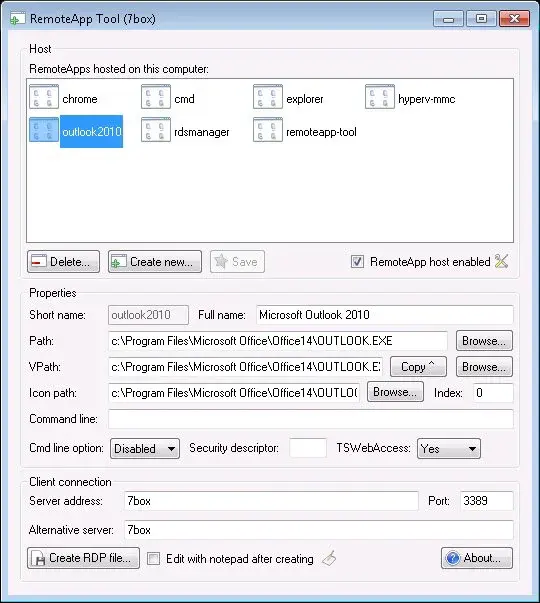
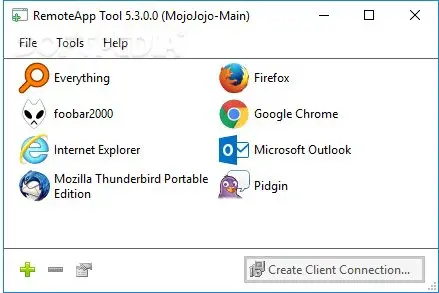
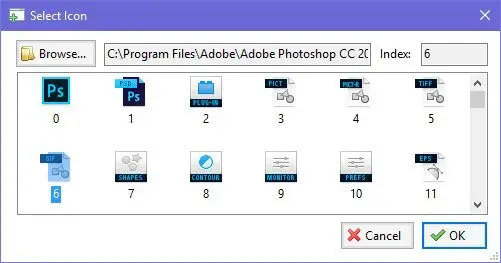
RemoteApp Tool is software that allows you to create or manage remote applications hosted on Windows 7, 8, 10, and XP. Through the Microsoft RemoteApp technology, you can seamlessly use an application on your PC that is already running on another computer. It deals with multiple functions like Create and manage RemoteApps on Windows desktops and servers, Generate RDP files create MSI installers along with WiX Toolset, Use as Remote Desktop Gateway, Set options such as session timeouts, Select icons for your apps, File type associations for deployed apps, Sign RDP files, Backup RemoteApps and many others.
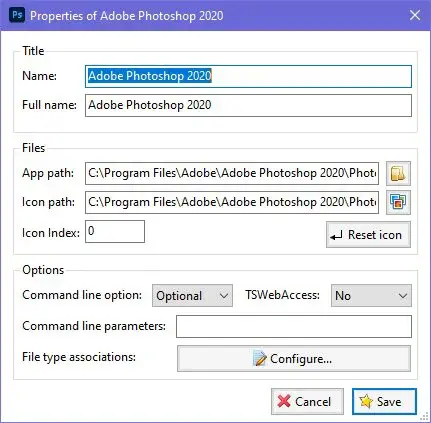
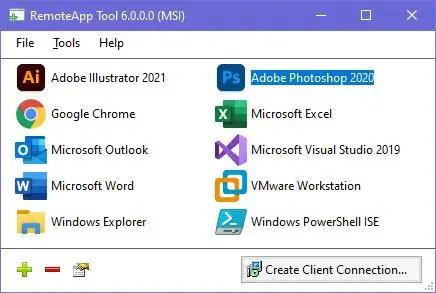
RemoteApp Tool is fully compatible with Adobe Illustrator 2021, Adobe Photoshop 2020, Google Chrome, Microsoft Excel, Microsoft Outlook, Microsoft Word, Microsoft Visual Studio 2019, Windows Explorer, and many more.
RemoteApp Tool Alternatives
#1 Chrome Remote Desktop
Chrome Remote Desktop is a connectivity program allowing the desktop PC and other operating systems users to access the computer of someone from their computer using the Google Chrome web browser. It is widely supportable for Windows, Mac OS X, Linux, and Chromebook operating systems.
Using this web-based platform, the users can use the computer or mobile devices of other users of their own. After making the connection between two, it becomes easy for the users to access the files, data, and apps of another computer over the internet just by using the Chrome Remote Desktop.
It can also be used for giving access to other PC as well, and in case of providing access to the other remote PC, the user of other PC will get full access to the files, emails, apps, documents, history, and much more.
In the remote connection system of the Chrome Remote Desktop, the sharing PCs can be made available on either short term basis for hoc remote support or on a long term basis for enjoying remote access to the apps and files. The best about Chrome Remote Desktop is that it always ensures the security and privacy of connection being made. It is one of the best and free means of enjoying remote access.
#2 Remote Desktop Manager
Remote Desktop Manager is a remote connection program based on the principle of password management system for the IT professionals to make the connection between remote PCs. The highly advanced and secure connecting technology makes the data administrators, IT professionals, and IT admins to centralize all of their passwords, remote connections, and sensitive data at a single platform that is then possible to be shared among multiple authorized users.
The main advantage of using Remote Desktop Manager is the security, productivity, and speed that you will get. Moreover, it will reduce the risk for the IT department as well. It is available in two editions, mainly Remote Desktop Manager Free and Remote Desktop Manager Enterprise. Both have their advantages.
If you want to use Remote Desktop Manager for standalone purpose, then Remote Desktop Manager Free will suit you most. If you’re going to use this in the case of multiple teams and users, then Remote Desktop Manager Enterprise is the perfect solution.
The main features of both editions are remote connections, password management, team solution, documents and information, security, availability of management tools, user interface, and much more. Remote Desktop Manager is simply the best option for all types of remote connections.
#3 join.me

join.me called itself a remote access software, but its features are more in the screen sharing category. This software is widely used for organizing online meetings and team collaboration. For the information of the readers, they can use join.me as a means for remote connectivity as well, but as we mentioned in the above lines that its functions are more in screen sharing as compared to the remote access.
The software widely supports all types of activities, either it is arranging meetings or conferences are then giving instructions to the other person about how to manage the computers. All of the advanced connectivity and remote PC management features are included in this program.
join.me has now launched the mobile app as well that is delivering the same functions as being offered by the desktop and online version. It will let you take your collaboration and management to the next level.
With just a click, you can start the connection, and the data sharing will be started instantly. join.me is available in two plans mainly join.me Pro and join.me Business. Join.me features limited functions restricted to online meetings only during join.me Business offers the premium level of meetings with advanced management capabilities.
#4 mRemoteNG
mRemoteNG called itself the next-generation remote connection manager widely available for the Linux operating systems. It makes its users able to view all of their remote connections in a more simple way. Just like other remote connection managers, mRemoteNG also offers to access remote PCs, but what is unique in mRemoteNG? One thing that makes this special one is that it shows all activities in a tabbed interface.
For the better management of the remote connections, mRemoteNG supports a wide range of protocols that such as a terminal server, remote desktop, virtual network computing, Citrix Independent Computing Architecture, secure shell, telnet, HTTP, HTTPS, raw socket connections and much more.
In the recent version of mRemoteNG, the developers have added many features and updates. It is now able to manage better than before. The multi-tabbed interface of mRemoteNG makes the users able to get the data organized in proper order just to access the multiple connections at once in a more standardized way.
The multi-tabbed interface of mRemoteNG makes it easy for the users to control all connections using a comprehensive sidebar. Moreover, it becomes also easy for users to create new connections as well that can be made by way of name, hostname, IP, username, and password.
#5 X2Go
X2Go is a new way of connecting two operating systems using the NX technology protocol. It allows remote access to the Linux operating system users with a graphical interface for a low bandwidth connection. The solution is also known as one of the best remote desktop solutions because of making the work of its users easy and straightforward.
With the usage of X2Go, you can access Linux systems. Some functions are used to connect to Windows PC as well, but most of the features are available for Linux operating systems only. Overall you can connect from a PC running Mac OS X, Linux, or Windows operating system.
For the information of the readers, X2Go also allows its users to access a single X2Go server at the same time, with each client having a separate desktop session by default. However, in that case, desktop sharing or remote assistance is also possible.
The basic features of the X2Go are the ability to reconnect and disconnect to a session, support for sound, support for many simultaneous users, file-sharing system from client to server, printer sharing from client to server, remote support via desktop sharing, the choice to select from multiple desktop environments and much more.
#6 Apple Remote Desktop
Apple Remote Desktop is a remote desktop management program that allows Mac users to manage their Mac devices on their network easily and securely. After making the connection between two Mac devices, users can provide real-time assistance to the end-users in the shape of distributing software, creating detailed hardware and software reports, and automating the routine management tasks without even leaving the PC desk.
The list of functions contains the remote spotlight search system, Automator actions, auto installation, curtain mode, remote drag and drop system, power copy, system status indicator, application usage reports, user history reports, smart computer lists, task templates and much more.
Apple Remote Desktop is simply the best way to automate routine management tasks. The advanced features in the shape of remote spotlight search and Automator actions will make your job easier than ever. After installing the Apple Remote Desktop, you will realize that all types of time-consuming admins tasks will become a thing of the past. Apple Remote Desktop is packed with over forty Automator actions, and to use any action, and you are only required to use the drag and drop system just to construct the action.
#7 rdesktop
rdesktop is a free and open-source remote desktop protocol client designed to make the users able to manage their PCs. It is UNIX-based system support for the remote access and management of almost all operating systems. Rdesktop is widely available for the BSD, Linux, and Windows operating systems.
The recent version of the solution has implemented as a comprehensive subset of the protocol in which most common are bitmap caching, file system, audio system and printer port redirection. It also offers printer port redirection, mappings for the international keyboards, stream compression and encryption system, automatic authentication system, support for a smartcard, remote all to support seamless mode, and network-level authentication.
Unlike most of the remote desktop connection programs, rdesktop still offering its support for the traditional RDP 4 protocol as well. For the information of the readers, it is not designed to work as a simple remote connecting program. It is used on desktop React Operating System and Linux operating system installation to connect to MS Windows running remote desktop services.
At present, many GUI clients are using rdesktop and are front ends to this program. This program has been integrated into a wide range of thin client Linux distribution projects and also in some thin client appliances as well.
#8 Jump Desktop
Jump Desktop is a new type of remote desktop program and VNC client for Apple devices. It is a remote desktop connecting program for connecting iOS devices to the PC. This program is fully supported for multitasking and use of full Bluetooth keyboard as well so that the users can get full command and control in the data management.
For its amazing features, Jump Desktop is called one of the most reliable and secure remote desktop programs for Apple devices, Android devices, and PCs that make all of these operating systems users able to connect to any PC, anywhere in the world. Once connected, it will unleash the all power of your devices when comparing to other devices.
With the additional support of full Bluetooth keyboard, multitasking, audio streaming, auto-correction, and several other options, you will be able to use your devices to the maximum. There is no hassle setup at all.
Everything will be getting ready in less than five minutes. The automatic configuration system of Jump Desktop will make the PCs quick as it doesn’t require the users to have technical knowledge in advance. The users can connect to the PC using an IP address or hostname as well.
#9 eHorus

eHorus is one of the best remote desktop management systems that make the IT administrators able to manage all those PCs located at another place. There is no need to travel to another location just to repair the errors of PC. eHorus is an advanced remote desktop SAAS solution that contains the many features in the shape of the remote terminal, remote file transfer, remote process management, and much more.
eHorus is a perfect platform for getting access to the other PC from a web browser. The solution makes it easy for users to integrate a remote management system into their management system. For the information of the readers, eHorus only need to install a small-sized agent on your devices run as a service.
These agents then connect the servers so that the user can then connect from anywhere that has an internet connection. The main highlighted features and functions of the eHorus are universal remote access, forget about all types of firewalls or proxies, cost efficiency, and flexibility and can be used from any operating devices just from the web browser.
#10 Viubo
Viubo is one of the best and simplest remote access and screen sharing service for all operating systems. There is no need to install any software in the system at all, as everything is in the cloud. Just create an account at Viubo and then connect to the other PC without any further delay at all. Viubo has made the remote access super and simple.
The users are only required to have their favorite web browser as Viubo doesn’t ask for any installation of any app or plugin at all. What makes Viubo special is that it gives the users a secure platform for building a secure connection.
It lets its users use the one-time ticket system to keep their connections under their command and control. Within a few minutes, you will be ready to make a connection with other PC located at any other place. The best about Viubo is that it is available for almost all operating systems, from desktop PC to smartphone devices and tablets.
#11 Chicken of the VNC
Chicken of the VNC is a remote desktop management program for the Mac OS X operating systems. Being a lightweight yet powerful and simple to use connection system of Chicken of the VNC makes it easy for the Mac OS X users to operate the other Mac system as they want. It put its users at ease by giving them full command and control on the connections they want to make.
Chicken of the VNC is a highly advanced remote connection management program that allows the users to interact with other remotely located systems and gain full command and control over the other PC. After making the connection with other systems, the users can then enjoy the unlimited access to the other PC.
The features of the solution are automatic server discovery, a navigation system, an auto-scrolling system for the full-screen mode, keychain integration, remappable, CPU performance throttling, smart Unicode key bindings, support for native multi-button, mouse button emulation, and much more.
One of the best things about Chicken of the VNC is that it gives the users an option to develop the system as they want is its capability of being customizable. The source code of Chicken of the VNC is also available for free for those users who want to develop it as per their own needs.
#12 DWService

DWService offers a remote management service to its clients in the shape of remote support for the IT equipment, especially the PCs, remote administration, and instant remote access. It offers two types of remote access and remote desktop management services to its client.
One service is connecting to other systems by way of the online connectivity system, and the other way is getting the software installed in both PC and starting an agent temporarily. Both systems offer the same features and functions. In both, you will enjoy the all command and control for remotely accessing the other system.
In both options, the user will be first required to get himself register at the DWService, and after that, he can either use the online connectivity service or can install on the home PC. Overall, DWService empowers the PC users to securely share everything on their system and access every data of the other PC and manage the other PC without any further delay at all.
With the assistance of DWService, you can share the entire folder from one PC to another PC without even going to publish the photos on other servers. For the safety, security, and privacy of the connection, DWService never stores any data shared on its servers. You will always enjoy safety and privacy while using this program.
#13 dualmon
dualmon is a brand new way of accessing the PC from any area of the world. This advanced remote access management program has made the process of accessing the PC very easy and straightforward. It is a perfect way for securely accessing the screen and controlling the PC from any operating system for assistance, remote access, and even holding official meetings as well.
The best about dualmon is its simplicity, reliability, and easy access for both personal and business uses. For personal purposes, it is available for free, and for companies, the solution has many plans. Three key benefits of using dualmon are free remote desktop access management system for both individuals and business users, on-demand remote assistance with the attended support, and a complete enterprise solution for quickly scaling for any size business.
Now check out the essential features of dualmon in detail in which most common are available for all the time, remote control management from anywhere and from any device, transferring files and data, remote printing system, support for multi-monitor, and mobile access. It also offers a two-factor authentication system, access from even mobile, IP whitelisting system for additional protection, perfect user management system, screen blanking system, streaming multimedia files, and much more.
#14 ThinLinc

ThinLinc is a remote desktop server for most of the operating systems and devices that allow the users to manage most of the PCs from any part of the world and at any time. It will enable the IT-based organizations and those organizations that provide remote services to impose a server-based computing system and centralize the computing resources in the data center.
This trend is increasing the demand for remote management programs. The best about ThinLinc is that it ensures the security of the data being transferred between two systems.
It also allows its users to access their programs and apps from any part of the world whether they are traveling abroad or sitting at any other location or working from the customer site. For the information of the readers, all types of data and documents will remain secure in the server area.
So don’t worry about the flow of your sensitive information at all. In case your device got damaged during the sharing process, then the data will remain safe on the servers of the ThinLinc, and any time you can again access the data for free.
#15 UltraViewer
UltraViewer is a free to use remote desktop management program that offers complete support for both client and partner systems from any part of the world. It is a freeware program that provides an easy to use remote control management support to its users. Most of the users use it for online education and offering repair and maintenance services remotely.
UltraViewer has recently added many features to its services sections in which most commons are safe remote access, chat window, share the files and data of all types, support for multi-computer, and much more.
Want to know how to control the PC of others or give access to your PC to other persons? Once you and the other partner install the UltraViewer, both of you will be given an ID or password. If you want to access the system of others, then put the IOD and password of other people into your UltraViewer main window and click on the connect button.
The system of other people will automatically come into your control. The main advantages of using UltraViewer are that it saves time, efforts, traffic cost, employee cost, support more professional. There is no geographical restriction at all over using this program.
#16 Thinfinity Remote Desktop Workstation
Thinfinity Remote Desktop Workstation is one of the best programs for viewing, editing, and sharing the data and files among multiple devices. It is ideal for remote administration and virtual support, can be used for even printing files from the local printer of a remote desktop.
There is no need to install Flash Player, Java or any other plugin as Thinfinity Remote Desktop Workstation always comes in ready to use mode. Simply zero client setup is required while using this state of the art management program. The main advantages are that it gives access and management of the PC from any device. It is ideal for remote administration and virtual support, allows the users to work on their projects from any part of the world, and available for free for both personal and commercial uses.
Features of this program include remote audio management, support for MS RemoteFX, remote printing option, touchscreen integration, high performance, support for the remote clipboard, availability of active directory, support for all standards SSL VPNs, availability of secure authentication and encryption, and support for even Android devices as well.
#17 Alpemix
Alpemix is the name of a simple to use remote desktop management program that works with the acquaintances of the users in different places, allowing them to sit side by side on the same PC or remotely. The main features offered by the Alpemix are easy to the user interface, all in one solution in a standalone program, top-level security standard, option to create a contact list, advanced file transfer system, instant messaging, availability of voice call system and access even behind the firewalls as well.
Three main usages of the Alpemix are remote assistance and maintenance, distance education, presentation and meeting, and in house usage. With the usage of Alpemix, you will become easy for you to assist your partners, client, or friend remotely by connecting to their PC.
What makes Alpemix perfect for being used as remote assistance and maintenance program is that it doesn’t demand having any technical or adjustments knowledge at all. Alpemix is simply the ideal solution for each type of remote control and remote desktop management activities.
#18 RemoteToPC
RemoteToPC is a software that makes it easy for IT administrators and networkers to give remote support to their client and partner’s PC. This software provides all those tools considered to be essential for remote PC access and various other types of IT management requirements.
This software is best known for offering its users the unattended remote access and state of the art RMM tools for secure remote access to the PC. Check out what you will get while using the RemoteToPC are easy installation, secured access to other PC, a perfect command center, support for multisession and alerts in case RAM, CPU, or disk starts to get maxed out.
RemoteToPC is available in three versions that are RemoteToPC Basic Remote Access, RemoteToPC Business Plan and RemoteToPC Enterprise Command Centre. RemoteToPC Remote Access gives the users access to at least ten PCs at once.
In the other plans, the users can even access over a hundred PCs at once. Moreover, in all plans, RemoteToPC allows its users to make the remote PC connection via network firewalls easily. All these features and functions collectively make the RemoteToPC one of the best remote desktop management program available over the internet.
#19 Windows Remote Desktop
Windows Remote Desktop is a remote desktop accessing and connecting feature of the Windows operating system that enables Windows users to easily connect their computers to other computers that are running Windows.
After this, the user can enjoy the access and control of the entire computer and its programs and files from the local computer, just like using it physically by sitting in front of the remote computer. The users are first required to have network access and permission to connect to both systems.
It is one of the best technologies that provide you with the feature of staying in touch with your home computer from your office and vice versa. The main features of making the connection between two systems are to accessing the programs, files, and network resources like you are sitting in front of your local computer and work instantly.
Almost all versions of the Windows operating system are supported. The main highlighted features of Windows Remote Desktop are quick access to remote resources, secure connection to data and programs, a comprehensive management system for managing all remote connections, high-quality sound, and video streaming system, and a lot of others.
#20 RealVNC
RealVNC is a remote accessing and controlling software for desktop PC that provides the users with the tools of remotely accessing and controlling their desktop or mobile from other desktop or mobile operating system. RealVNC can be used by individuals to large enterprises to manage their devices from a single platform for remotely accessing them.
RealVNC is a simple way to take control of the remote computers and enjoying these as driving a car in a video game. The main advantages of using RealVNC are that it is versatile that provides the users with a secure and responsive remote access along with the other features of automation, management, and monitoring devices.
Being cross-platform remote access software RealVNC is available for almost all operating systems, devices, and even browsers. By using RealVNC, you can also make the connection in VNC Cloud as well, where there will be no requirement of network reconfiguration.
If you want to connect and control your remote PC from a local PC, then RealVNC is the best option for that where you are simply required to provide the PC’s IP address and start accessing and controlling it. You can even control multiple pieces as well by giving the IP addresses of all these.
#21 GoToMyPC
GoToMyPC is software that gives you the freedom of remotely accessing and managing desktop PC or Mac from any other device and any part of the world. Just connect two systems and enjoy the features of remote access from any device. After making the connection between two systems, you will be able to instantly work on your programs and files from your local place as you are doing at your work desk at home.
The best about GoToMyPC is that it provides users with the system of accessing their PC from their smartphones. Controlling, accessing, printing, watching movies, installing software, enhancing the security, optimizing the performance, files & data transferring, browsing, and a lot of other features are supported in the GoToMyPC.
From a local computer, you can do all these as you were doing on your remote computer. GoToMyPC also supports for the multi-monitoring where the users can enjoy the system of displaying of all connected computers on the local monitors. Last but not least, there is the report generating system of GoToMyPC that is for tracking the performance of sessions, including the duration of connection as well.